disguising my online traffic :)
messing with vpns
[wency suo]
intro
One of my biggest headaches while traveling in China has always been deciding which VPN to use. To watch YouTube or access anything outside the Great Firewall (GFW) I would have to route my traffic through a server outside the country.
In the past I’ve tried a few paid services like Surfshark, NordVPN (their ads are everywhere) but none have worked consistently for me. Granted, there’s a legitimate reason why VPN reliability may degrade over time. VPN traffic can tend to have distinctive patterns that then get detected and blocked, providers have to push fixes to restore access for those on the service periodically.
As with any VPN service you also have to trust a 3rd party vendor with all of your network traffic so they can forward your encrypted requests to your final destination. I’m sure there’s a lot of discourse online about whether or not to trust VPNs/ISPs and the like but for me climbing subscription fees and data privacy is really just a pretense for learning how to set up my own private network!
It can’t be that hard right?
how does the internet work again
Let’s start by reviewing some foundational networking concepts. Hypertext Transfer Protocol or HTTP is how data gets passed between machines to render websites. Assuming some familiarity with client/server architectures (cloudflare has some decent materials), you can think of the GFW as a monitor at the ISP level.
The GFW is smarter than just checking blacklisted URLs, it uses an advanced network security probing method called Deep Packet Inspection (DPI) to analyze the packet sizes, timing patterns, handshake signatures of your traffic. Even when content is encrypted, traffic can look like VPN traffic, which is exactly how VPN connections get detected and throttled. Your destination IP and requested domain name is also usually public and unencrypted since TLS encryption only protects the content of the client server communication, so everything after a handshake is established not before.
So our goal here isn’t necessarily encryption but actually making our traffic indistinguishable from regular HTTPS browsing.
my options
A few projects have emerged to fill this specific niche over the years. The most popular and well established tool that I came across is Shadowsocks, which introduced its own encrypted SOCKS5 proxy protocol. The protocol unfortunately has a detectable fingerprint, so the GFW has gotten pretty good at identifying it over time. For this reason I chose to keep looking for other tools. Granted, I haven’t tested it out myself so perhaps for my use case this would’ve been fine.
V2Ray adds a layer of obfuscation on top to disguise proxy traffic as WebSocket, gRPC, or HTTP. This gets pretty close to a convincing disguise! However, from what I can tell, V2Ray doesn’t fully hold up against active probing, where the GFW sends it’s own requests to servers it suspects might actually be proxies. To handle this properly, V2Ray requires custom fallback configs to respond properly to requests from unauthorized sources.
Trojan builds on this idea of mimicking regular web servers by actually running a proper web server with a valid TLS certificate, making proxy requests indistinguishable from valid HTTP requests. In the case of active probing, when a request is sent to a trojan server that isn’t a valid trojan request then the server, which also runs Nginx, gets served a real webpage. This does mean that in order to use Trojan I need to actually register a domain which is another upfront cost that might influence which tool you would pick to set up your own proxy server. This wasn’t an issue for me so I chose this option for my server.
It’s worth mentioning that ShadowSocks and V2Ray has some pretty great documentation in comparison to Trojan. V2Ray is part of a broader ecosystem of tools that help you build your own privacy network called Project V and the community investment in maintain documentation shows. Working with Trojan was a little more difficult since there are several unmaintained repos that you have to sift through to find the most recent fork, though the setup instructions have remained consistent.
deep dive into trojan
To understand what Trojan is doing, it helps to have a quick mental model of how a request travels from your browser to a server.
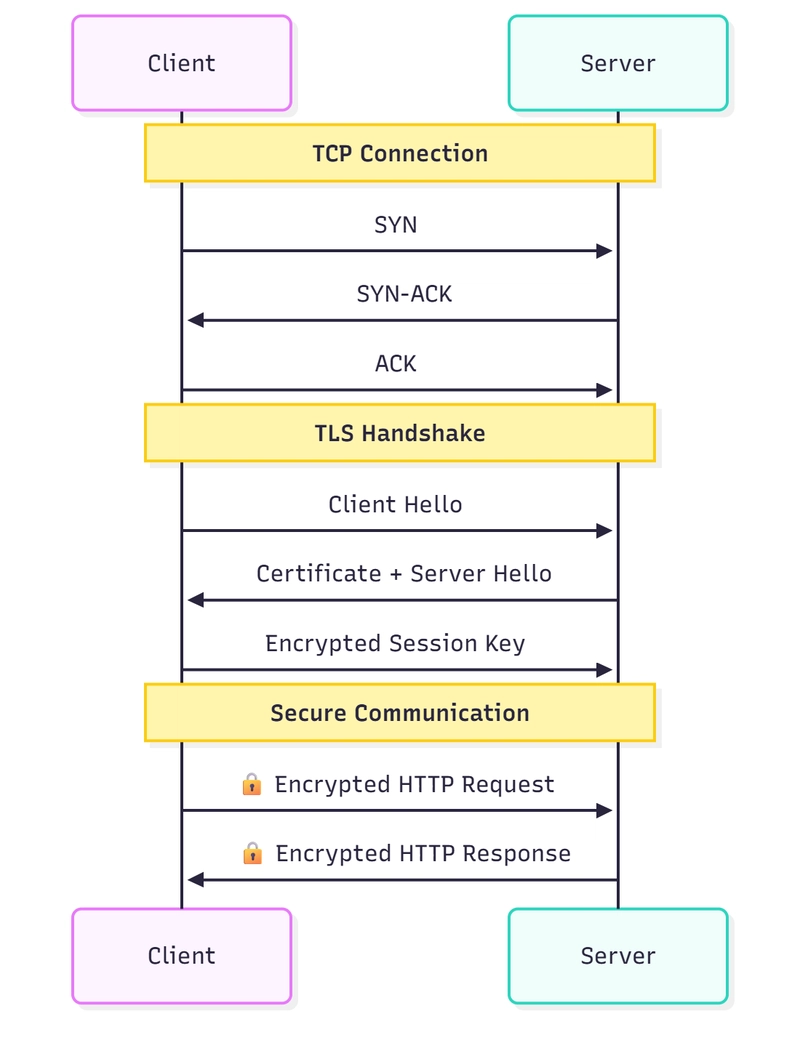
When you type a URL, your machine resolves the domain to an IP address via DNS, opens a TCP connection to that IP, and if it’s HTTPS, negotiates a TLS handshake before any application data gets exchanged. TCP is the transport layer and handles reliable ordered delivery of packets. HTTP sits on top and defines the structure of the actual request and response. TLS sits between them and handles encryption.
What legitimizes this request is the TLS and to complete the TLS handshake we need a properly signed certificate for our web server. When your browser connects to a server, the server presents a certificate signed by a trusted Certificate Authority (CA). Your browser checks that the signature is valid and that the certificate matches the domain you’re visiting to establish a chian of trust from the browser’s built-in root CA down to the certificate on the server.
Trojan requires that you obtain a real certificate for a real domain. That means your server looks exactly like any other HTTPS server. Same handshake, same certificate structure, same everything. There’s nothing synthetic for DPI or active probing to uncover.
server setup
I really spent some time thinking about where and how I was going to go about setting up my own server since it seemed like an easy excuse to get my hands on a Raspberry PI. I genuinely did want to explore this option since it would also give me full hardware control but I was on a time crunch before the trip, so this will probably have to wait until I get back.
I also briefly considered repurposing my home router. Routers are essentially small Linux computers that also have network switches so flashing it with tools like OpenWrt would’ve let me protect every device on my home network automatically at the router level with no per-device config needed. The problem is with my ISP which locks down the hardware :( so OpenWrt isn’t really an option, again future project once I get back.
So the easiest and cheapest solution to all of my problems is to secure a free VPS from Oracle. Using the free tier does mean that my server might not have the best uptime since I’m at the mercy of whatever OCI is doing with their servers but honestly I’m not confident that I would have better reliability running a Raspberry Pi out of my apartment anyway.
managing proxy traffic
Setting up the proxy is just the first step, to actually use my VPS I also have to connect my devices to my server and manage my proxy requests. The brute force approach is to route everything through the proxy. For this to work you would need to route all of your traffic, all the way down at the system level through my server. This is admittedly wasteful but it does work. The better approach here is to define a set of rules, maybe based on domain, device etc. so that you selectively use your proxy.
This is what proxy managers like Clash handle. You define rules in a config file and Clash decides how to route each request. It’s also possible to define multiple proxies and set fallback behavior if one goes down, which means you’re not betting everything on a single server. Hurrah Redundancy!
keeping the server running with systemctl
Right now I’m starting the Trojan-Go process manually over SSH, which is fine for testing and deeply not fine for anything else. If the server reboots, the process dies and stays dead until I notice and SSH back in.
The fix is turning it into a systemd service, which is Linux’s standard way of managing long-running processes. All I have to do is write a unit file that describes how to start the process, what user to run it as, and what to do on failure, then register it with systemctl. After that, systemctl enable trojan-go means it starts automatically on boot and systemctl restart trojan-go gives you a clean way to reload config changes. Logs go through journald, so journalctl -u trojan-go gives you a clean view of what the service is doing if anything goes wrong.
what to do from here
I set things up in kind of a rush so that I can get a minimum viable product for my upcoming trip so there’s still a lot of work to be done. I can surf the open web but I still need to actually measure my performance and request latency. In another post I’ll explore profiling tools and optimizations i can make to my current system to achieve a smoother web browsing experience.
Until next time!